
June 22th, 2026
Let your favorite agent harness operate your computer: Introducing HoloDesktop CLI
Run H Company’s world-leading Computer-Use Agent on-device and call it from your favourite agent harness.
Your agent got stuck again. It needs the Q3 receipts, but they’re sitting in a folder it can’t open, but they're photos it can’t see. Or, it built you a nice web application and confidently called it done without ever clicking a single button to check that the Graphic User Interface (GUI) actually works.
Today's agents are brilliant at the things with a clean interface: they write code, call MCP tools, retrieve with RAG. But the moment a task lives behind a GUI with no API, like managing files across desktop apps, QA-testing the app it just shipped, pulling amounts off receipts into an expense form, they're stuck. A brain and a keyboard locked inside a sandbox, with no eyes and no hands on your machine.
Computer-use agents are meant to close this gap, but the capable ones are expensive enough that running a real, multi-step desktop loop costs more than the task is worth.
H Agent, our Computer Use Agent (CUA) specialised in GUI navigation and web browsing, was built for exactly this.
What HoloDesktop CLI is
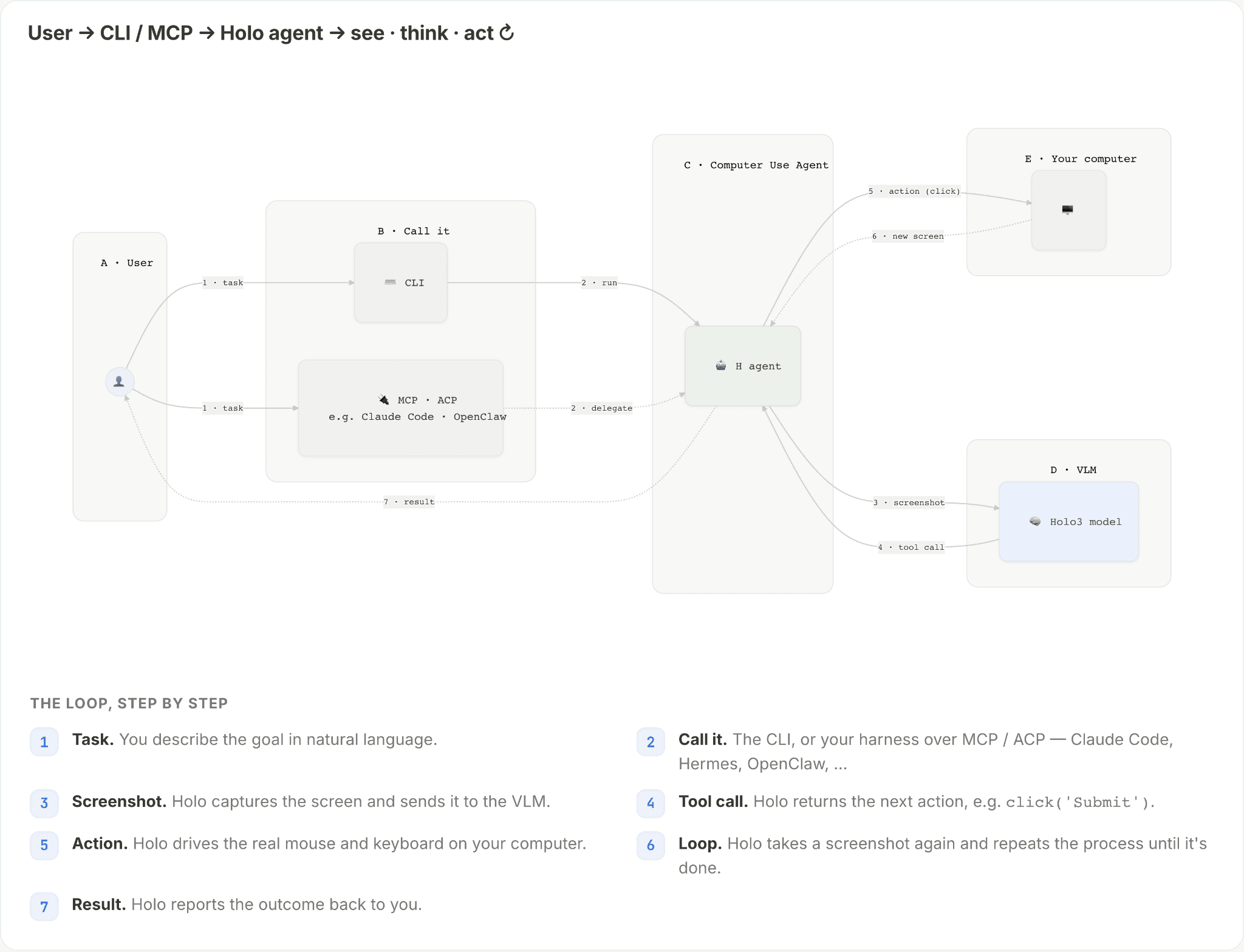
HoloDesktop CLI is the open-source client that launches and drives H Agent, H Company's agent for computer use, directly on your computer. H Agent looks at your screen and drives the mouse and keyboard across the whole operating system.
HoloDesktop CLI runs H Agent on-device. It controls your desktop locally, with model inference through our Models API or fully self-hosted and exposes MCP, ACP, and A2A integration for popular harnesses such as Hermes, Claude Code, OpenClaw, NemoClaw, Cursor, or Codex.
See it work
We show two examples how HoloDesktop CLI can be used as a Computer Use Agent to serve as the eyes and hands in Claude Code and Nvidia NemoClaw respectively completing visual tasks that the coding agent otherwise couldn’t.
QA-testing an app with Claude Code
From a user prompt, Claude Code adds a new UI feature to a local web app. Then it hands the QA loop to the HoloDesktop CLI for QA testing the new UI feature.
HoloDesktop opens the app, logs in, navigates like a real user, and visually checks the product flow. In the demo, it catches a regression in ticket filtering and reports the failure back to Claude Code. Claude Code fixes the bug, asks HoloDesktop to verify the flow again, and then checks the surrounding dashboard and chat assistant still works.
The result is a development loop where the agent does not stop at a passing build. It uses the product, catches the bug, verifies the fix, and packages a change that has actually been exercised in the browser.
Automate your expense report claims across your devices
Filling out your expense report claims from receipts is a time consuming and repetitive task: from a receipt, extract the amount and description, fill out an expense report form, rinse and repeat until all receipts are processed, and send the report to your finance department.
With HoloDesktop CLI, you can automate this process. Just give HoloDesktop the command, e.g., from your phone, where you directly send the photos to your laptop, and watch HoloDesktop do the work.
Get started
On first run, the hai-agent-runtime binary installs itself (sha256-verified), and `holo doctor` is there to diagnose anything that trips - runtime, credentials, port, permissions - with one-line fix-its.
Repo: HoloDesktop CLI
Quickstart: Documentation on our Hub
Model: Holo3.1 35B-A3B on Hugging Face (self-hosted) or Holo Models API
Run the model anywhere
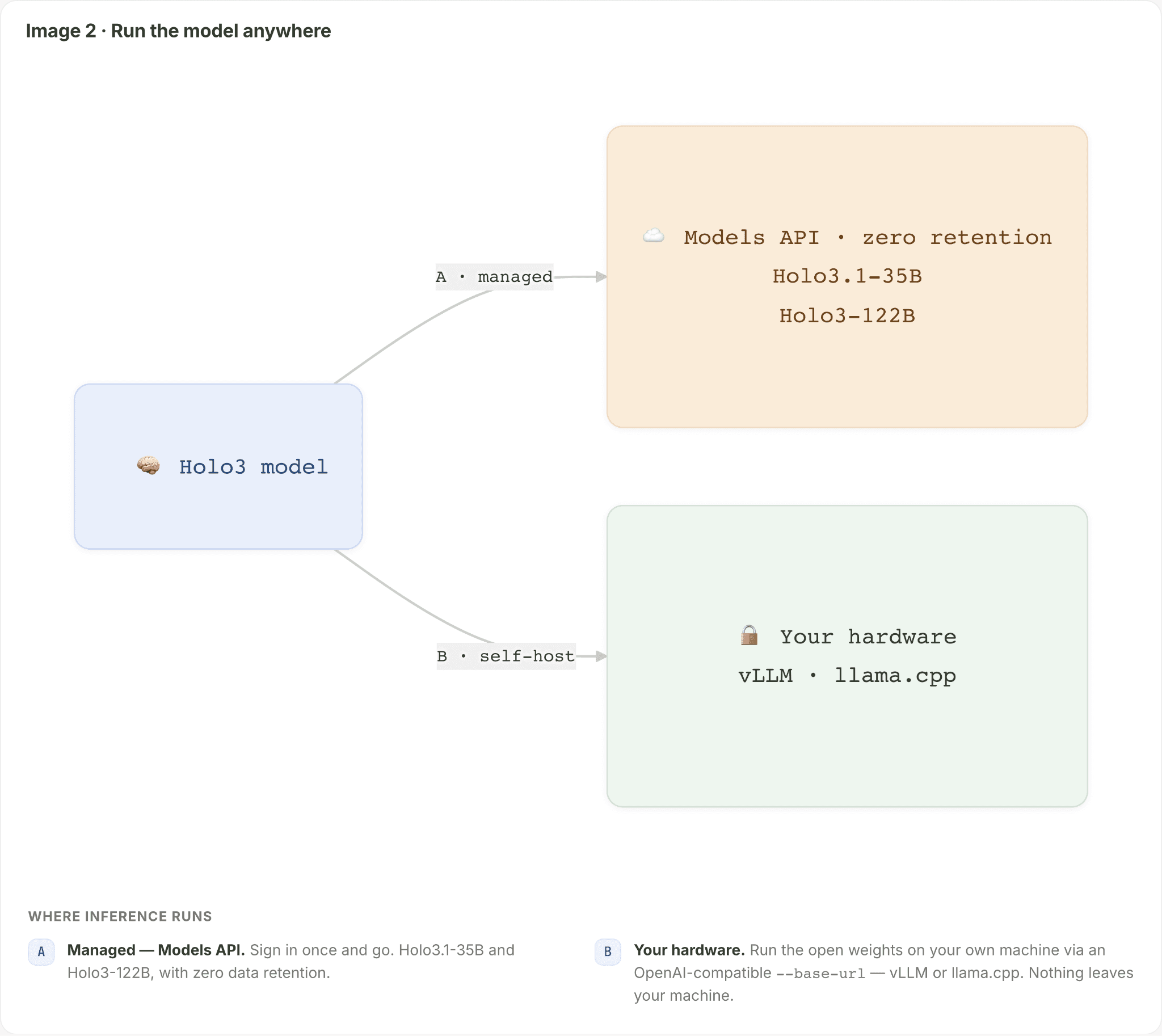
H Agent is powered by Holo3 and Holo3.1, our most capable, multi-modal computer use model. You choose where inference happens while the client and API stay the same:
Managed through our Models API: Sign in once and go. Holo3-1-35B (Apache 2.0, fully open) is available on free and paid tiers, while the Holo3-122B flagship is on the paid tier. The model API runs with zero data retention on SOC 2- and ISO 27001-certified infrastructure. Your data stays private and safe. Find out more.
Self-hosted on your hardware: In our previous Holo3.1 release, we shared quantized checkpoints of our 35B-A3B model in both Q4 and NVFP4 formats. This lets anyone with a NVIDIA DGX Spark / GB10 System, GB300 or RTX GPUs, or Apple Mac mini, MacBook Pro run Holo3.1 locally. Just point HoloDesktop at any OpenAI-compatible server using
--base-urlin the CLI, e.g., vLLM on an NVIDIA DGX Spark with the NVFP4 weights, or llama.cpp at Q4 on a Windows RTX PC / Mac. No login, no token costs. Nothing - no screenshots, no keystrokes, no app content - ever leaves your machine.
Try it out:
Fast Local Inference with NVIDIA
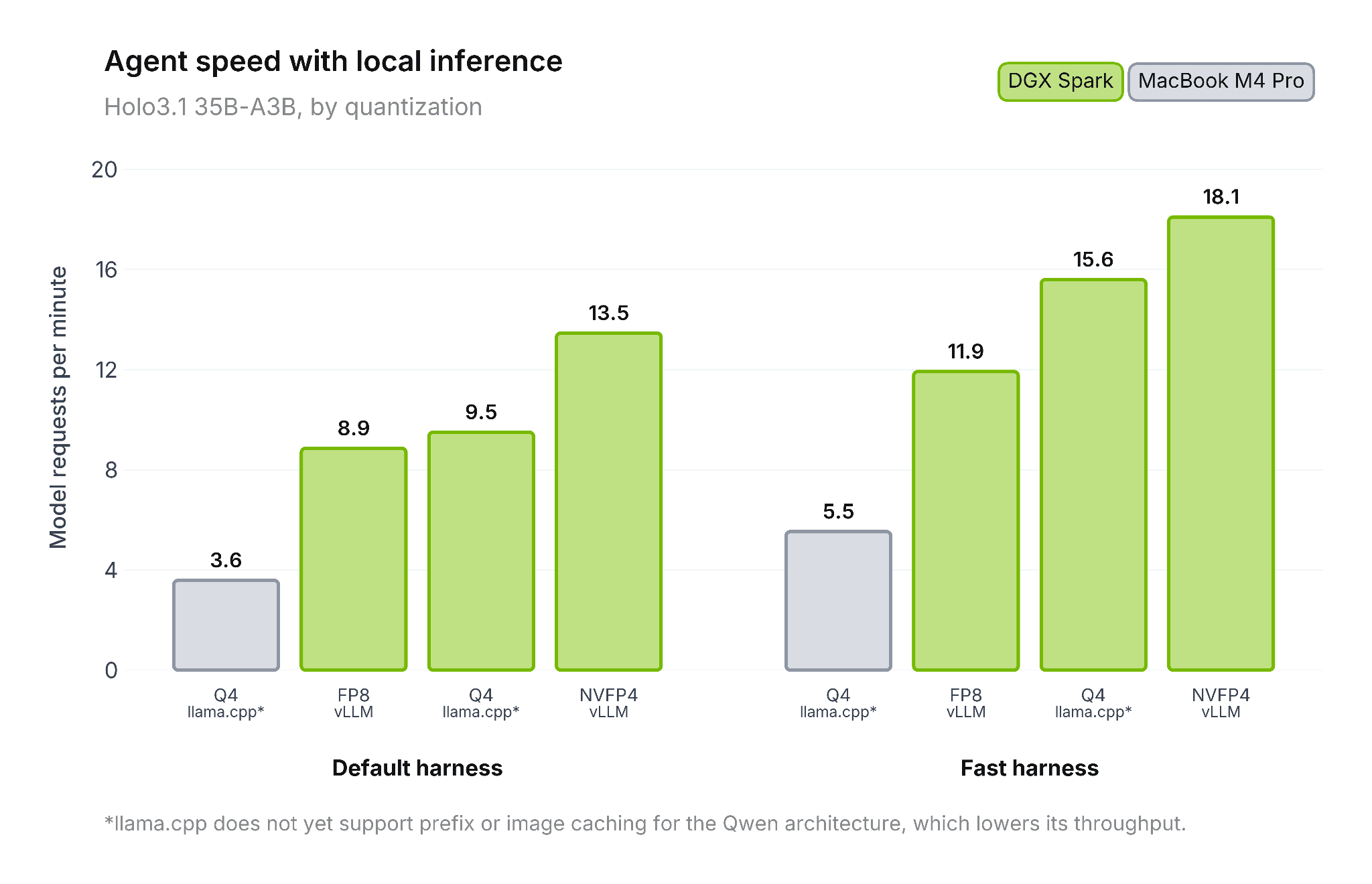
We collaborated with NVIDIA on harness improvements and model quantization, achieving up to a 2x speedup over the default harness with unquantized weights.
This takes the agent from ~7 seconds per step, to ~3 seconds - a substantial difference in responsiveness and interactiveness
We worked with NVIDIA on two complementary optimizations for RTX GPUs & DGX Spark. First, NVFP4 quantization reduces the model’s numerical precision while preserving model quality, lowering its memory by 35% and compute requirements. Using NVIDIA’s ModelOpt methodology, we ensure the drop in accuracy is minimal.
Second, agent-harness optimizations streamline the surrounding execution loop - the software responsible for sending model requests, processing responses, and advancing the agent through each action.
Together, these improvements deliver a compound speedup of roughly 2× compared with the FP8 baseline. The chart below compares agent request rates across hardware platforms, numerical precisions, and two operating modes.
Use --fast mode for additional speed at the cost of slightly reduced quality. Based on our benchmarks, we recommend running the NVFP4 checkpoint on a DGX Spark for the fastest local experience. See the Holo3.1 release page for details.
Frontier computer-use, without the frontier price
CUAs take many steps. Every screenshot, every click, every retry is tokens. For an agent running a model like Claude Fable 5, a real multi-step desktop loop gets expensive fast, e.g., for example multiple thousands of dollars to complete Agent’s Last Exam. The more capable agents get, the more low-cost inference matters.
Holo3-35B is priced at $0.25 / 1M input tokens and $1.80 / 1M output tokens. A frontier computer-use model like Claude Fable 5 runs $10 / $50 for the same amount of tokens. On a typical (input-heavy) computer-use task that's roughly 30 - 40x cheaper via our API; and effectively free when you self-host the Apache-2.0 weights on your own box. See Hugging Face weights here.
Input / 1M token | Output / 1M token | |
|---|---|---|
Holo3.1 35b | $0.25 | $1.80 |
Claude Fable 5 | $10.00 | $50.00 |
HoloDesktop makes long, multi-step runs economical and keeps them private on your device that you don’t think twice.
Use agents how you’re used to: plug into the harness you already run
HoloDesktop CLI isn't another closed ecosystem you have to migrate into and refactor your entire codebase and workflow for. It is a Computer Use Agent for the agent you already use. When your main agent needs to read a screen or click through an app, it delegates to Holo and gets the answer back.
We provide the CLI, MCP, ACP, A2A for integration into Hermes, OpenClaw, Codex, Claude Code, and Cursor today. One command wires it into every host it detects:
holo install also drops a Skill where supported, so the parent agent learns when to hand off to H Agent, not just how to reach it.
HoloDesktop CLI exposes four surfaces, so it fits however you build:
Surface | Command | When |
|---|---|---|
CLI |
| One-shot tasks from your terminal |
MCP |
| Delegate from your agent harness (e.g., Claude Code) |
ACP |
| ACP hosts (Hermes, OpenClaw, …) |
A2A |
| A local HTTP server for your own agents |
And if you'd rather embed it directly, holo_desktop.agent_client is the same client every surface is built on with pause / resume / cancel and mid-run send_message for interactive control.
What's next
HoloDesktop CLI gives your agent harness the one thing it's been missing: eyes and hands on your own machine. The GUI-bound work that used to dead-end it, like finding and managing files, QA-testing the app it just built, turning a pile of receipts into an expense report, now runs locally, in any app, under your control, and at a cost that lets the agent actually finish the job.
And we're just getting started. We're continuously improving the agent and building new ways to put it to work: a background mode so it runs while you keep using your laptop uninterrupted, and a native app so H Agent sits right beside your daily workflow.
That's the local story. For teams that need to go further, we're soon releasing cloud-based Computer Use Agents on managed infrastructure: multi-agent scale beyond a single machine, 24/7 runtime, centralized auditability and traceability, enterprise security, and platform observability. Same H Agent; you pick where it runs.
Join us
Try it, break it, tell us what you build!
Start now:
holo run/holo installStar the repo: HoloDesktop CLI
Join the Discord. Share what you’ve built and talk to the H team: